
Use TypeSafe’s Jev in Excel
With Jev in Excel, you can classify thousands of rows with a single formula, and soon score and check them too. Jev is a new kind of AI model that doesn’t write essays. It makes quick, consistent decisions, so your sheet fills in fast and costs almost nothing to run.
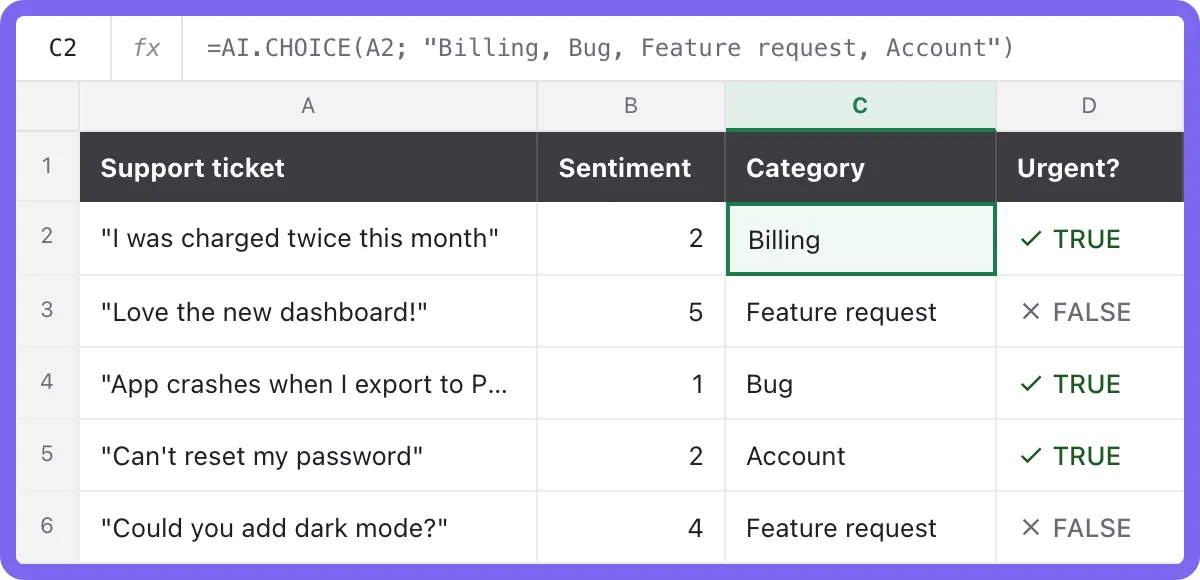 5 rows · 0.4 s
Three Jev formulas for making decisions in Excel
Most AI formulas write text. Jev makes decisions. Give it a row and a question, and it returns a clean answer you can sort, filter and chart right away.
Put every row in the right bucket
Categorize text in Excel with your own labels. Jev picks the best match for each row, and it never invents a label you didn’t ask for.
=AI.CHOICE(A2; "Billing, Bug, Feature request, Account")Score anything on your scale
Run sentiment analysis in Excel, or rate lead quality, priority or fit from 1 to 5, or on any scale from 2 to 10. You get a number, so you can sort and average it straight away.
=AI.SCORE(A2; "How positive is this review?"; 5)Get a yes or no for every row
Ask a yes/no question and get TRUE or FALSE. Use it to flag urgent tickets, spot spam or check whether a row meets your rule.
=AI.CHECK(A2; "Is the customer asking for a refund?")How to use Jev in Excel in three steps
1Install TwistlyCells.
Add the TwistlyCells Excel add-in from Microsoft AppSource. It’s free to start.
2Write a formula.
Type =AI.CHOICE next to your data, the same way you’d use any Excel function. AI.SCORE and AI.CHECK are coming soon.
3Fill down.
Drag the formula down the column, and Jev answers each row almost instantly.
What you can do with Jev in Excel
Support triage
Sort tickets by topic and flag the urgent ones in seconds.
Product categorisation
Map messy product names to your own catalogue categories.
Review sentiment
Score thousands of product reviews from 1 to 5.
Spam & quality checks
Flag junk sign-ups, fake reviews or incomplete entries.
Lead scoring
Rate inbound leads on fit before your sales team calls.
Survey coding
Turn open-ended survey answers into themes you can chart.
Why use Jev for these jobs?
Most AI for Excel tools run on chat models like GPT and Claude, which are great at writing. For simple row-by-row decisions, a decision model like Jev is a better fit.
TwistlyCells still uses chat models for writing tasks like AI.ASK, AI.TABLE and AI.TRANSLATE. Jev handles the decision formulas.
Available on every plan
Questions about Jev in Excel
Start using Jev in Excel
Add TwistlyCells to Excel for free, then type =AI.CHOICE next to your data. AI.SCORE and AI.CHECK are coming soon.
Add TwistlyCells to Excel — freeJev is a model developed by TypeSafe AI. TwistlyCells is an independent product and isn’t affiliated with, sponsored by or endorsed by TypeSafe AI. All trademarks belong to their respective owners.